









2027 IPPS Final Rule
Featured article
CMS published the final rule for Hospital Inpatient Quality Reporting and Medicare Promoting Interoperability programs for FY 2027.
MEDITECH offers three reporting tools (NPR, Report Designer, and Data Repository), each with distinct strengths. DR and SQL Server let you visualize data quickly, crosswalk NPR components to SQL tables, and serve as a learning platform for new report writers.
It doesn't matter which MEDITECH version you have; from MAGIC to Expanse, each reporting technology has its own strengths and weaknesses. Whether it's good old NPR, Report Designer or Data Repository with SQL Server, you can get the most out of each of them by using them together. While Data Repository has increasingly become the "go-to" choice for many reports, DR and SQL tools can also be used as an intermediary tool to help you build better NPR and RD reports too!

Data Repository gives you a window to the data you need, whether it's from NPR, RD or DR. A crucial part of any report is understanding the underlying data organization and hierarchy. Using DR and SQL can help you build the roadmap to more efficient report development, including understanding macros, writing more efficient rules or troubleshooting selection reports. Because Data Repository lets us visualize the data, and because DR and SQL Server return query results so quickly, we gain a better understanding of how NPR and RD logic and rules work, allowing us to choose the right tool for any report.
First there was NPR. MEDITECH's proprietary programming language has a steep learning curve, but is great for paper reports, provides easy screen layout for report definitions, and has some advanced capabilities like macros and versatile output capabilities. On the downside, performance can be slow, and it can be difficult to bring together data from different applications. While MEDITECH has evolved key elements of NPR over its long life, it's now a legacy reporting tool as the 6.x/Expanse platform has grown.
With the 6.x environment MEDITECH created Report Designer, a more intuitive reporting platform with an easy to use point and click interface. For the advanced user they created rules which were written like English to perform basic functions. With its simple design and formatting interface, RD makes it easy to write basic reports (like patient lists, dictionary exports, etc.) but it's still difficult to write more complex reports and report runtime performance can be slow.
Meanwhile, Data Repository has been around for the better part of 20 years. While it was initially an optional MEDITECH component, it has since become an integral (and required) part of every MEDITECH implementation. The benefits of using DR for most of your reporting are well-known: the SQL Server platform makes development easy, report runtime performance is great (without slowing down "the system"), and we have a wide range of report presentation tools for graphically rich and informative reports and dashboards. At the end of the day, we as report writers should be able to use any of these tools, really, to pick the best one for the given job.
As NPR report writers, you learn about DPMs, segments and elements as the basic storage structures in MEDITECH. As an NPR tool, the online data definitions for these are an invaluable reference. Not only do they indicate the data storage hierarchy (that is, parent and child relationships), but in some cases you can "see" the underlying value logic. Wouldn't it be helpful to see just a sample of some of this data before you decide if it's what you need?
Fortunately, the DR application itself provides an effective way to "crosswalk" NPR data components to their SQL Server DR database counterparts. Using the table and field lookup tools, you can reference NPR fields to a specific table and column, allowing you to then preview the data if you like with a simple TSQL query in Management Studio. Once you can visualize the data, it makes it much easier to understand what you need and how it relates to other information you may need to include with it.
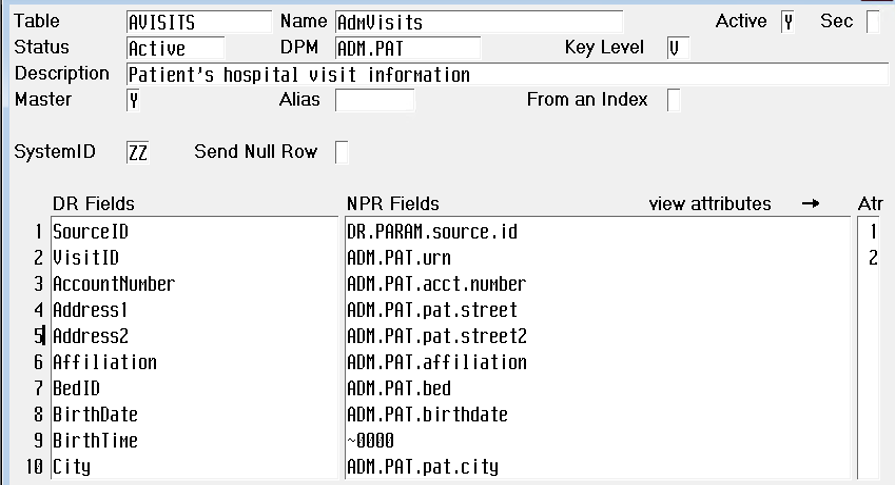
We have the same capability in the DR itself, in two tables that contain all the metadata about our system: that answer the question "what's in this table and where did it come from?" You can easily write queries against these tables by searching on a table name, a column name, and even NPR components so you're always assured you have the right data for your report.

Finally, Data Repository and the SQL Server toolset give you a great teaching platform for anyone learning about MEDITECH reporting. Rather than focus on the technology ("which tool should I use?"), DR allows you to focus on the data first. It's the novice analyst's window to the unknown. You can help them become a better and more proficient report writer using NPR selection reports and worklists, Report Designer custom reports, or SQL Server with Data Repository. At the end of the day, when you use them all together, it makes you a better report writer.



.svg)